Four more fixes for your VPS this week
A backdoored OVHcloud CLI, a Brotli bug in Node.js, a BIND flaw that mostly affects Kerberos setups and a CVSS 10 in GitLab, and what each means for a small server.


If you rent a cheap VPS and keep a handful of self-hosted tools on it, your update list grew quite a bit this week. One of the stories is a supply-chain attack on a command-line tool that plenty of OVH customers keep on their laptops and servers. The other three are runtime and server bugs where the fix is a version bump, provided you know which version you are actually running. These four come on top of the two we covered earlier in the week, PHP2Shell and the eMudhra root certificate with a guessable key, so if you have not dealt with those yet, start there.
OVHcloud CLI: official release binaries swapped for a stealer
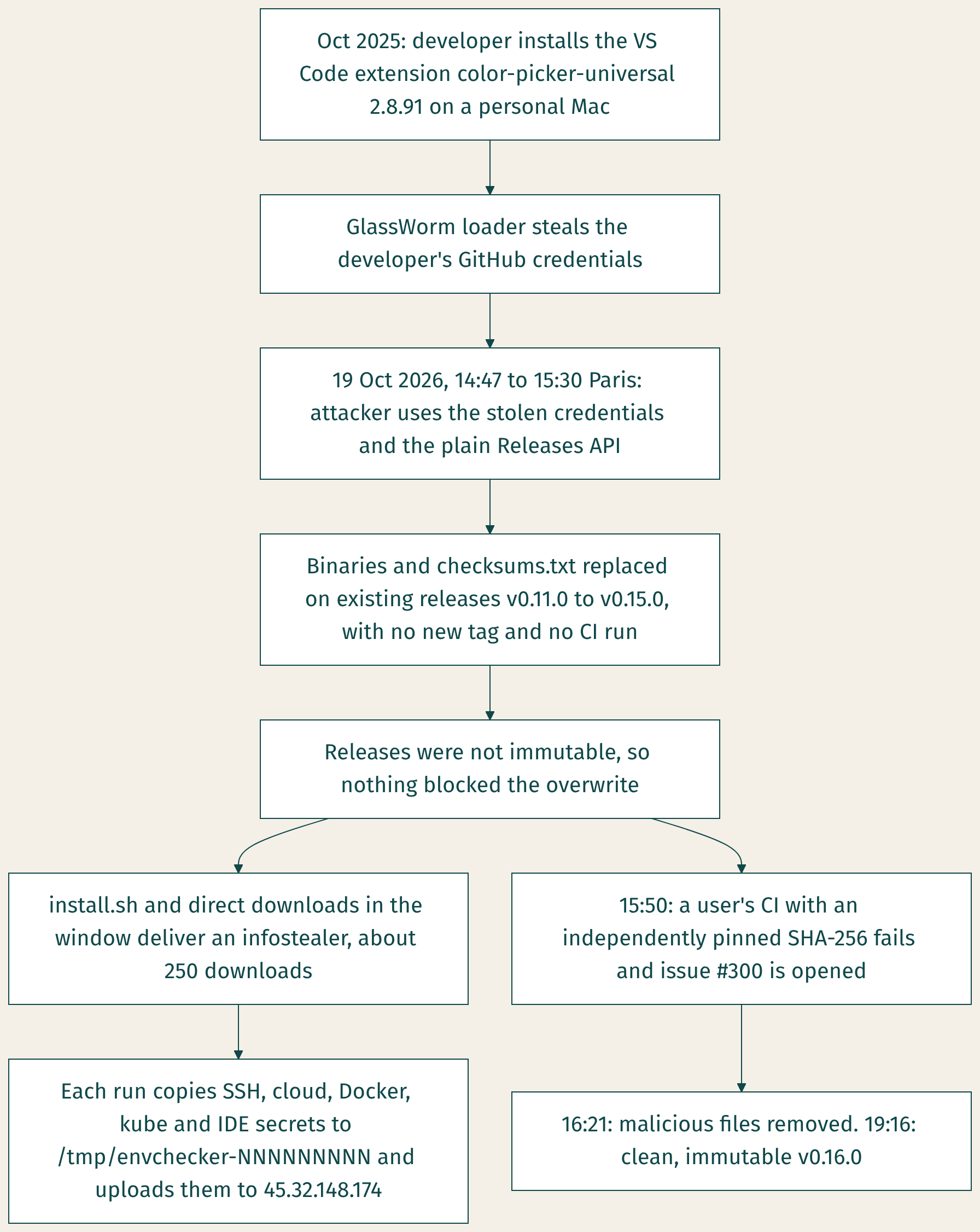
On 19 October somebody replaced the downloadable binaries of the ovhcloud CLI on GitHub with a credential stealer. OVHcloud confirms it in its own security advisory GHSA-862f-55f5-vmvw. The bad files stayed up for an hour and 33 minutes and were downloaded about 250 times in that window.
How it happened
The trail goes back a year. In October 2025 an OVHcloud developer installed a VS Code extension, color-picker-universal 2.8.91, on a personal Mac, and according to the advisory that extension belonged to the GlassWorm campaign and took the developer's GitHub credentials. OpenSourceMalware links the account to GlassWorm too, though it describes the link to the October upload itself as its own inference.
On 19 October, between 14:47 and 15:30 Paris time, the stolen credentials were used to overwrite the assets on releases that already existed, v0.11.0 to v0.15.0. None of this went through OVHcloud's build system: the attacker compiled the genuine CLI locally with an extra envchecker module and uploaded the result through the ordinary Releases API, with no new tag and no CI run. That was possible because release immutability was switched off on the repository. Because the release's own checksums.txt was replaced as well, anyone verifying against it would have seen a clean match.
The attack was spotted by a user whose CI pinned the SHA-256 hashes independently. Their build failed and they opened issue #300 at 15:50. OVHcloud removed the files at 16:21 and shipped a clean, immutable v0.16.0 that evening.
Who is affected
You are only at risk if you downloaded v0.11.0 to v0.15.0 between 14:47 and 16:21 Paris time on 19 October and then ran it. Earlier downloads of the same version numbers are clean, as are v0.10.0 and older and v0.16.0 onwards. The replaced builds covered macOS on arm64 and x86_64, Linux on arm64 and x86_64, and Windows x86_64. The install.sh script and direct downloads from the releases page were the main routes in, and SecurityWeek adds the CLI's own upgrade command. go install, source builds and the Docker image were not affected. Homebrew is disputed: some coverage lists it, but the cask pinned the original hash, so an install in the window should have failed its checksum rather than delivered malware, though nobody has confirmed this yet.
Each run of the trojanised binary creates a folder called envchecker- followed by nine or ten digits in the temp directory, copies secrets into it, archives them and uploads the lot. The list in the advisory includes ~/.ssh, AWS, Google Cloud and Azure credentials, ~/.docker/config.json, ~/.kube/config, npm and doctl configuration, Terraform credentials, ~/.netrc, ~/.gitconfig and the state databases of several code editors and AI coding assistants. The stealer never deletes its folder, which makes it the easiest thing to check for. No persistence has been reported for the CLI payload, so there is no reason to go hunting through cron or systemd for this one.
Check without running it
Don't run a suspect binary just to ask for its version. Instead, find every copy and inspect it from the outside:
command -v -a ovhcloud
ls -la ~/.local/bin/ovhcloud ./bin/ovhcloud "$XDG_BIN_HOME/ovhcloud" 2>/dev/null
go version -m "$(command -v ovhcloud)"
md5sum "$(command -v ovhcloud)"
ls -d /tmp/envchecker-* "${TMPDIR:-/tmp}"/envchecker-* 2>/dev/null
command -v -a lists every ovhcloud on your PATH, which matters if you installed it more than once or into a CI runner's tool cache. If go version -m reports v0.15.1-0.20261013083505-5ead8ef9b43d+dirty, that is the attacker's build.
Indicators of compromise
These come from the appendix of OVHcloud's advisory.
MD5 hashes of the malicious binaries:
- Darwin_arm64:
6f2f086239f3d88eb2750e871901927d - Darwin_x86_64:
347e65eb7f2d78d1c6872690272a6cc3 - Linux_arm64:
01f57206d37c28cf711677f612052913 - Linux_x86_64:
301bff0b51980b9e76c93633e7cfd3bd - Windows x86_64:
6a3cf153338c416169cda2fe704c8848
Network: uploads to hxxps://45.32.148[.]174/upload on port 443, plus calls to public Solana RPC endpoints (solana.drpc[.]org, solana-rpc.publicnode[.]com, solana.api.pocket[.]network, api.mainnet-beta.solana[.]com and solana.api.onfinality[.]io/public) using the wallet BHaDaVbdCYFNaKZGn7yLXFneWoJHZgLiBYkHxVrjyALF. Those Solana hosts are legitimate public services, so a hit on one of them on its own proves little. On disk, look for envchecker-NNNNNNNNN in the temp directory.
Rotate everything on that disk
If you ran an affected build, OVHcloud's advice is blunt: change every secret on the machine, and do it from a different, clean one. In practice that means a new SSH key pair, with the old public key removed from every authorized_keys file and from your OVH account; new cloud, Docker registry, Kubernetes, Git and Terraform credentials; and new API keys for any AI tools you use. Your OVH API keys in ~/.ovh.conf are not on OVHcloud's explicit list, but the advisory says the stealer ran unspecified extra commands, so revoke the consumer keys and create a new application in the OVH API console anyway. Then delete the binary, remove the envchecker- folder and install v0.16.0.
The lesson goes beyond OVHcloud. Neither the version number nor the checksum file next to the download told users anything here; the only check that worked was a hash someone had pinned themselves.
Node2Shell: remote code execution demonstrated on Express 5
CVE-2026-111497, nicknamed Node2Shell, is an out-of-bounds write in the Brotli decoder that ships inside Node.js itself. The Node.js security release of 21 October rates it High and its title says plainly that it permits remote code execution. CERT Santé gives it a CVSS score of 8.1, with high attack complexity and no login needed.
Ron Masas of Imperva, who named the bug, describes the exploit: Brotli data the decoder should have rejected left it carrying on in an invalid state and writing outside its buffer. His team reached code execution through express.json() and express.raw() on Express 5 with body-parser 2.x, which accepts Brotli request bodies by default. The demonstration ran on the official Node.js 24.22.0 image for arm64, and Imperva notes that it took several attempts in their setup and that other builds were not tested. In other words, RCE has been demonstrated on Express 5, which is not the same as any Node app falling to a single request.
Where the bug lives
The flaw is in Node.js core, so updating Express or body-parser does nothing for it. A bare Node HTTP server doesn't decode incoming Brotli on its own; the risk comes from code that decompresses data an attacker controls. In practice that means three paths: an Express 5 app parsing a request sent with Content-Encoding: br, server-side fetch() reading a Brotli-compressed response, and anything calling node:zlib directly. According to Brandefense, Express 4 with body-parser 1.x answers such a request with a 415 error and never decodes it, although we haven't checked that against the code.
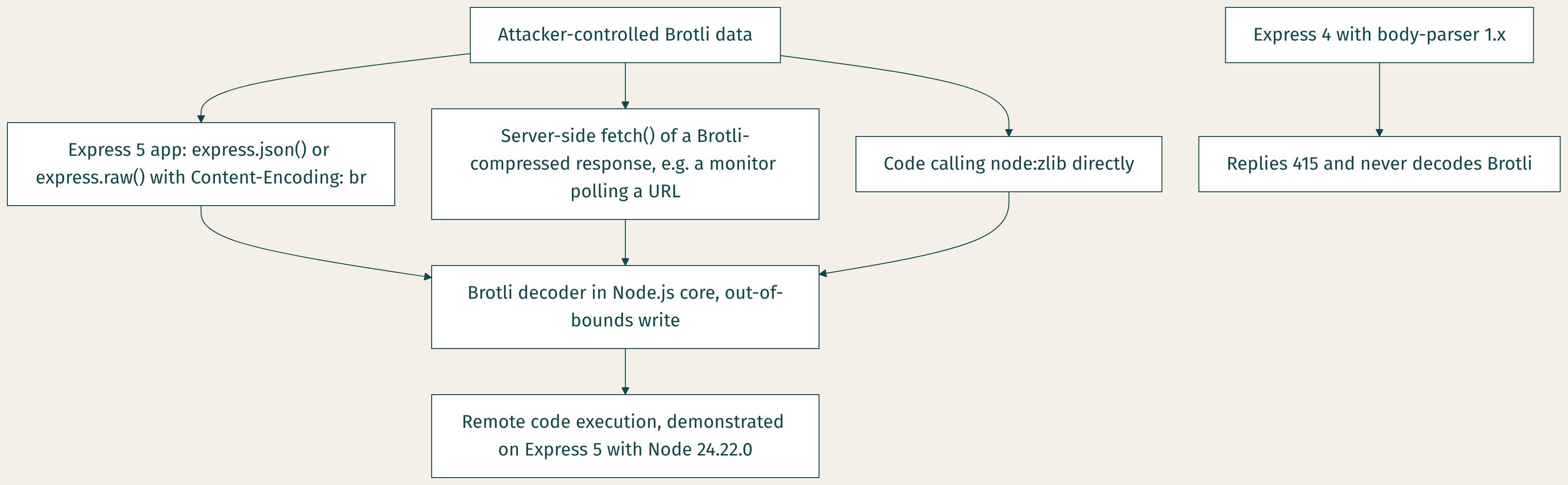
Fixed versions are 22.23.4, 24.22.1 and 26.12.1. Node.js 20 and older are end of life, affected and unpatched, so anything still on them needs to move to a supported line. There is a public proof of concept but, as of 22 October, no known exploitation and no official workaround. As a stopgap you can reject Content-Encoding: br at your reverse proxy or set express.json({ inflate: false }), though neither protects fetch().
What self-hosters run
Fortunately, most of the popular VPN panels are not Node apps. Based on the project Dockerfiles:
- Probably exposed: the Remnawave backend and its subscription page, which run NestJS on Express 5 on a floating
node:24.22tag, so images built before 21 October are on the vulnerable 24.22.0. Uptime Kuma runs on Node 26, and its HTTP monitors fetch remote pages, so a malicious Brotli response is a possible way in. Any image you built yourself from anode:base stays vulnerable until you rebuild it. - Not exposed at runtime: Marzban and Marzneshin (Python), 3x-ui (a Go binary, with Node used only at build time), subconverter (C++) and sub-web (static files behind nginx).
- Unclear: Hiddify, a Python panel we couldn't recheck; Cloudflare Workers, which run on workerd rather than Node; and the Outline server, which ships Node 18, which is end of life and will get no fix whatever the Brotli path turns out to be.
Check your version
node -v
docker exec remnawave node -v
docker inspect shadowbox --format '{{index .Config.Labels "shadowbox.node_version"}}'
docker compose pull && docker compose up -d
Repeat the docker exec line for the subscription page and Uptime Kuma containers. Pulling a new image only helps if the project has republished it on a patched Node, so check node -v again after the restart.
BIND 9: a GSS-TSIG flaw that mostly matters to Kerberos setups
ISC has published CVE-2026-94300, a High-severity bug (CVSS 8.1) in which concurrent or replayed GSS-TSIG-signed messages corrupt memory in named. The 9.20.30 release notes explain that a negotiated GSS-TSIG session was shared between messages without any locking. ISC says the result is a crash and possibly remote code execution, knows of no exploitation and offers no workaround. Affected versions are 9.11.0 to 9.18.50, 9.20.0 to 9.20.29 and 9.21.0 to 9.21.26, plus the matching -S1 editions. The fixes are 9.20.30, 9.21.27 and 9.20.30-S1. There is no fix for 9.18, which is end of life, so you either move to 9.20 or wait for your distribution to backport one.
ISC doesn't spell out a configuration requirement, so what follows is our reading of the mechanism. The bug needs a GSS-TSIG session, and BIND only negotiates one when tkey-gssapi-keytab or the older tkey-gssapi-credential is set, neither of which has a default. That points mainly at servers handling Kerberos-signed dynamic updates for Active Directory or Samba AD, and very probably not at an ordinary resolver. And if your DNS is Pi-hole, AdGuard Home, Unbound, dnsmasq, CoreDNS or Knot, you are not running BIND at all.
named -v
named-checkconf -p | grep -E 'tkey-gssapi-(keytab|credential)'
If the second command prints nothing, GSS-TSIG is very probably off. Update any BIND you run anyway, because the same release fixes other bugs, including a CPU-exhaustion flaw, CVE-2026-19630, that applies whatever your configuration.
GitLab: a CVSS 10 that reaches back to 2014
GitLab's critical patch release of 21 October fixes CVE-2026-110264, an integer overflow when compiling a crafted regular expression that, in GitLab's words, could "under certain conditions" let an unauthenticated user run arbitrary code on the server. It scores the maximum 10.0, and every release from 7.0 onwards is affected. The fixed versions are 19.5.1, 19.4.3, 19.3.6, 19.2.9, 19.1.9, 19.0.10 and 18.11.13, for both Community and Enterprise editions. Anything older than 18.11 should go to 18.11.13. GitLab.com is already patched.
There is no public proof of concept and no confirmed exploitation so far, and the CVE was not in CISA's Known Exploited Vulnerabilities catalogue on 22 October. GitLab has published two detections, "Onigmo native worker crash" and "Org mode render error burst", which are worth running against your logs after you upgrade. A GitLab instance needs a fair bit of memory, so it is less common on the cheapest boxes than Gitea or Forgejo, which are not affected. But it is exactly the kind of server people install once and forget, so if you have one, put it behind a VPN or Tailscale while you are in there.
What to do
- If anyone on your team has the OVHcloud CLI, run
command -v -a ovhcloud, check the hashes and look forenvchecker-folders. If you find a match, rotate every secret on that machine from a clean one. - Run
node -von every host and inside every container that ships Node, update to 22.23.4, 24.22.1 or 26.12.1 and rebuild your own images. - Check whether anything you run is actually BIND, and whether GSS-TSIG is configured, before you spend an evening on it.
- Upgrade GitLab to the fixed release on your branch and keep it off the public internet.
If you missed them, the PHP2Shell and eMudhra pieces are the other half of this week's list. None of these four is as noisy as PHP2Shell, but each one sits on the kind of quiet box that rarely gets a second look, which is usually where trouble settles in and curls up for a nap.